At a glance
- Begin with household activities, fixed features, and room relationships before choosing decorative details.
- Compare alternatives against the same room geometry. Change one decision at a time and record the tradeoff.
- Use the sample as an exercise. It does not establish universal room sizes, clearance compliance, or construction approval.
Start with the people and activities
Write down what happens in the home during a normal day. Include arriving with shopping, cooking, eating, working, resting, and receiving visitors. Note which activities happen together and which need separation. The same bedroom count can serve very different routines.
Translate the routine into a short room brief. A household may need a desk that can remain set up during meals. Another may need more dining seats and a quieter guest room. Decide which need takes priority before you arrange every object.
Keep a small list of decisions that the plan must answer. For example: can someone reach the deck while other people use the seating area? Can a dining chair be pulled out without interrupting another activity? These questions give you something specific to inspect.
Separate fixed conditions from movable choices
For an existing property, record the actual room boundaries, openings, service locations, and fixed obstacles. Treat their location as evidence rather than something to move casually in a layout exercise. Proposed building changes need separate technical review.
Furniture positions, some storage choices, and the job assigned to a room can be easier to compare. Keep those choices separate from assumptions about moving a wall or changing plumbing. A furniture experiment can answer a useful question without redesigning the whole building.
| Record first | Test in the layout | Keep as a separate review |
|---|---|---|
| Room shape and measured dimensions | Furniture positions and sizes | Structural changes |
| Doors, windows, and fixed obstructions | Desk, seating, and dining relationships | Changes to building services |
| Connections to adjoining spaces | Household routes and room use | Local approvals and technical compliance |
Read room relationships before placing small objects
Trace the route from the entrance to the shared spaces. Then trace common movements between kitchen, dining, bedrooms, and outdoor areas. Look for points where furniture and movement need the same space.
Place the largest required items next. Use their real dimensions and consider how people use them. A table can fit while a pulled-out chair blocks a route. A bed can fit while a wardrobe cannot open comfortably. Inspect these actions instead of comparing empty floor area alone.
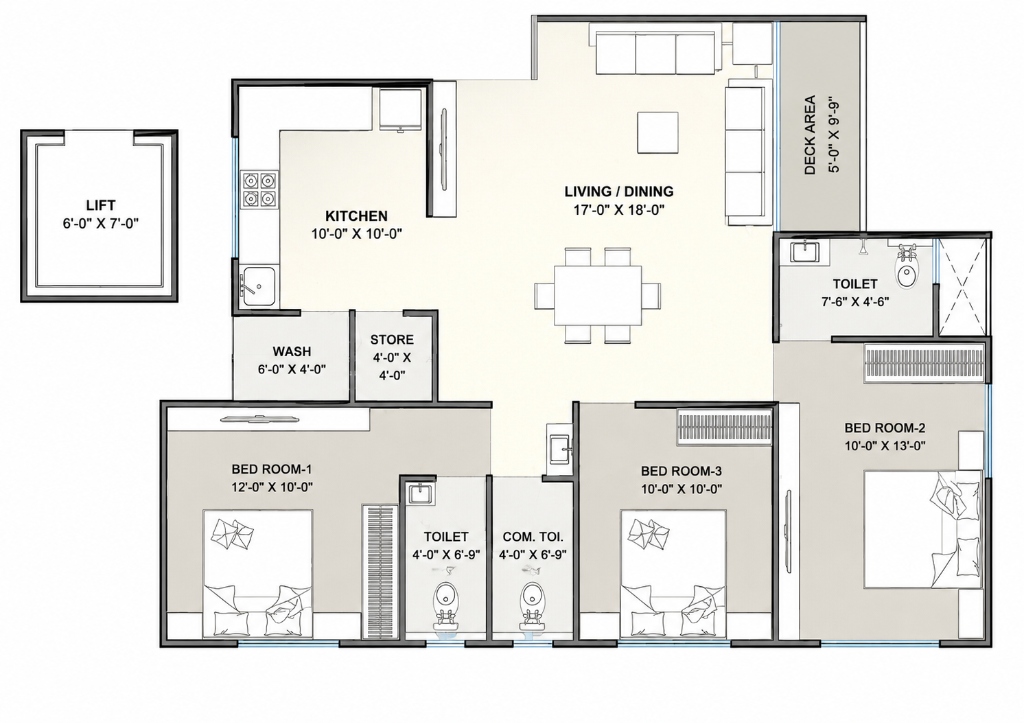
Use the 3 BHK guide for the sample room schedule. This guide focuses on relationships and alternatives, so a different-sized home can use the same method without copying those room dimensions.
Worked comparison: one home, one sofa change
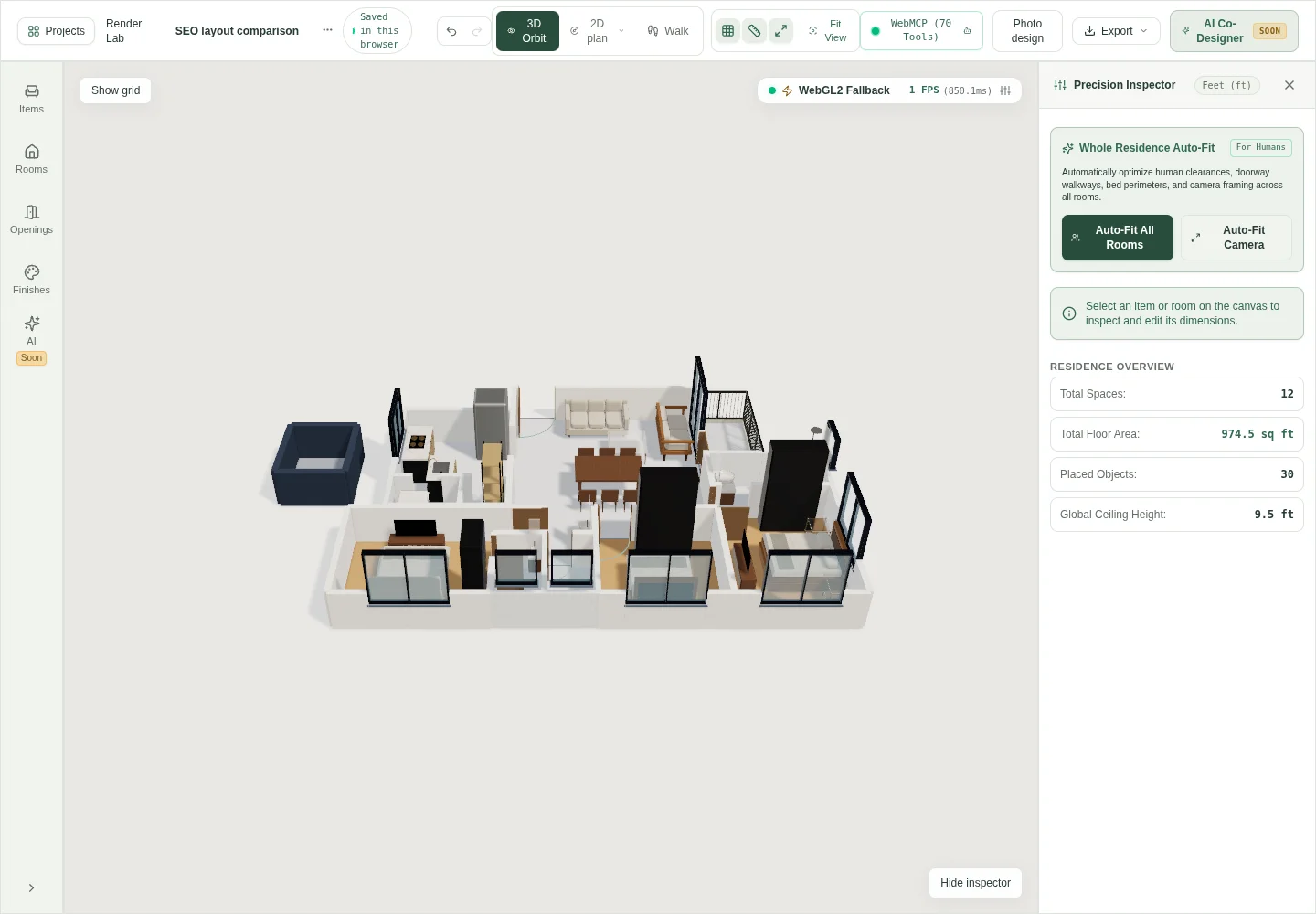
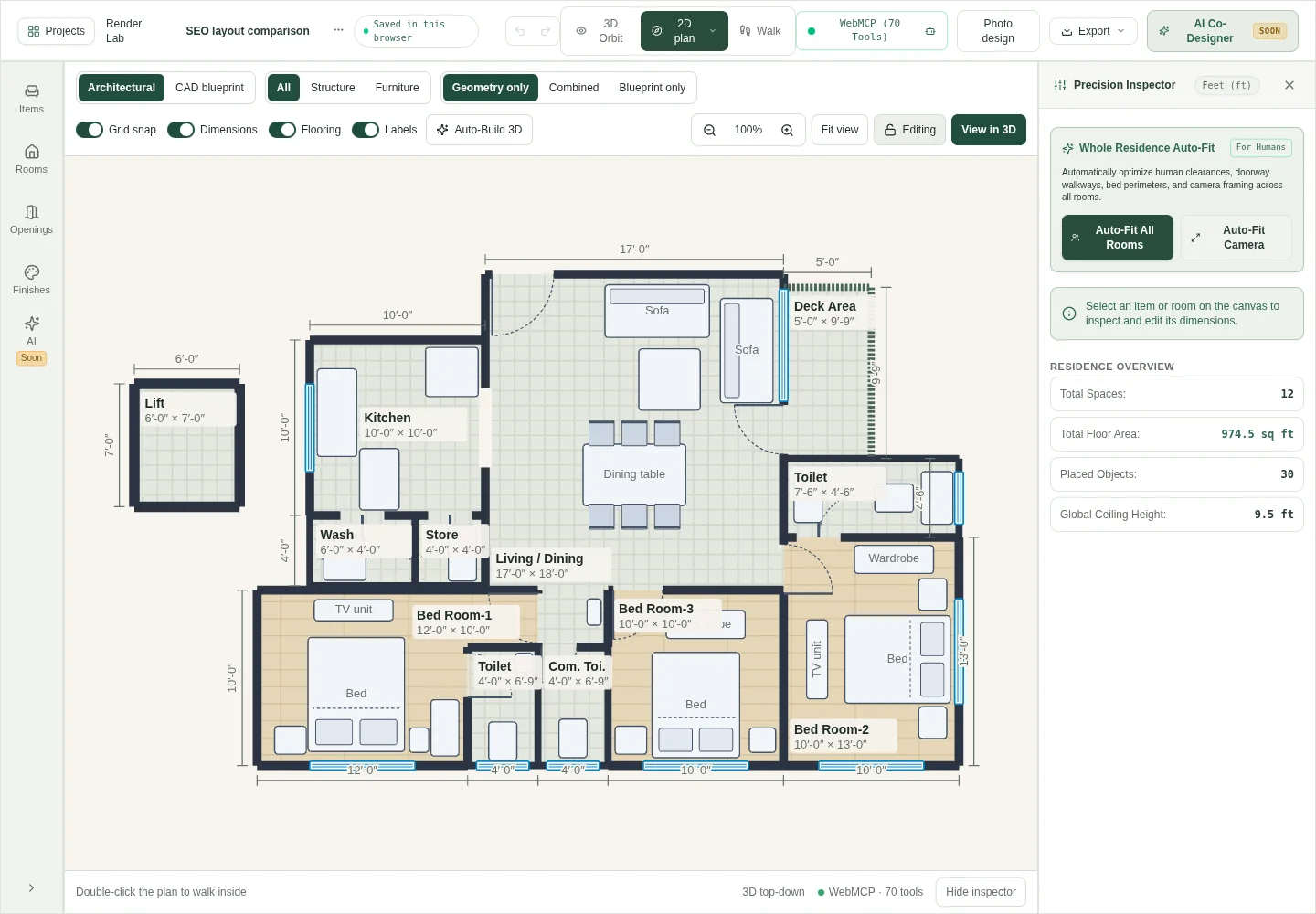
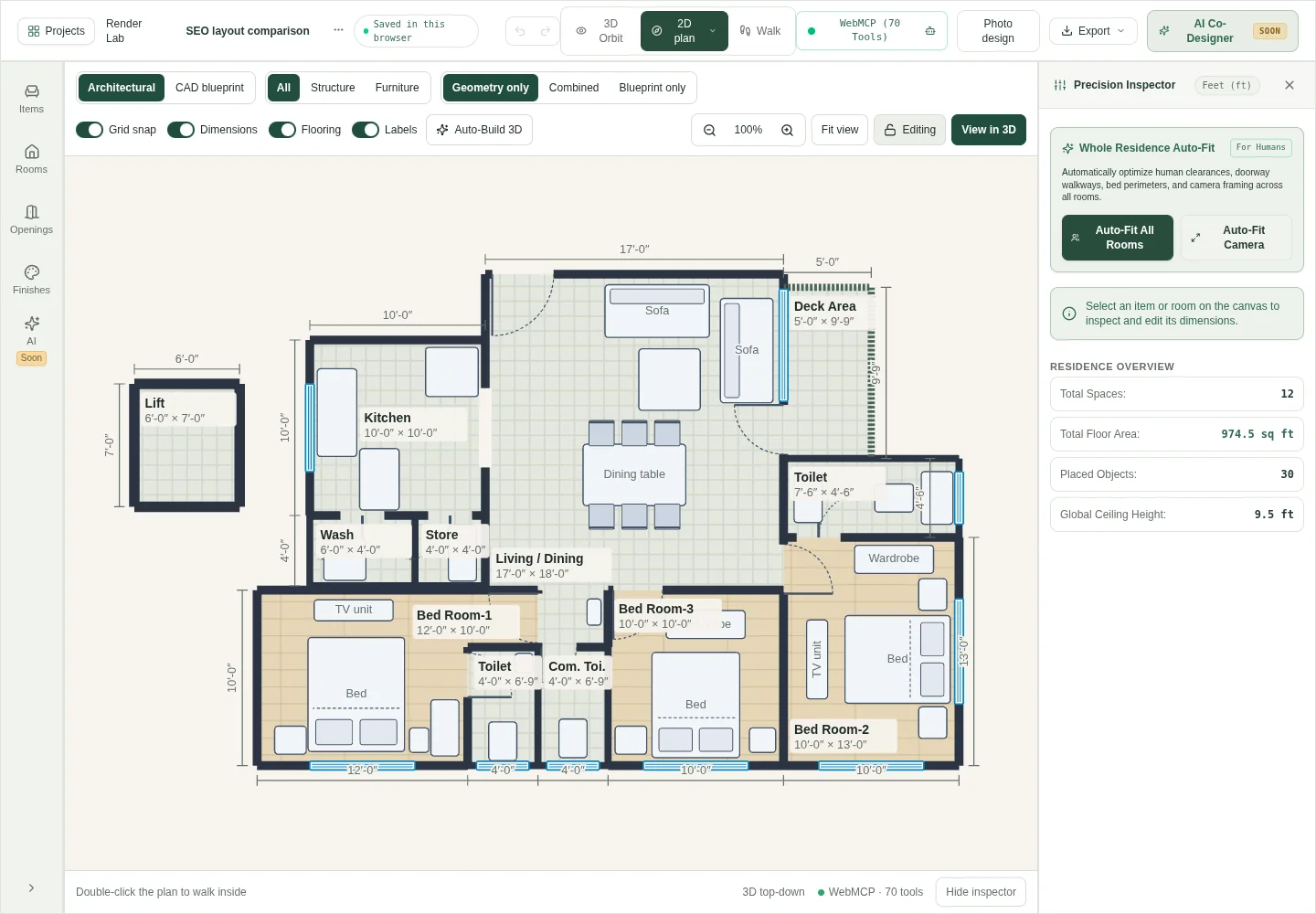
For this study, we created a fresh browser-local copy of the bundled 3BHK sample. The source drawing labels the living/dining room as 17 × 18 ft. Its modeled outline also includes an alcove. We retained that geometry, the openings, and the other furniture.
Arrangement A is the starting sample. For arrangement B, we selected one sofa and decreased its X position by exactly 2 ft in the inspector. This moves it left in plan view. The remaining furniture positions stayed unchanged. The screenshots let you inspect the consequence of that single change.
Check the sofa against the table, nearby furniture, and routes to adjoining spaces. The screenshots are evidence of the edit, not a claim that B is the better arrangement. Choose only after checking the activity and dimensions that matter to your household.
| Condition | Arrangement A | Arrangement B |
|---|---|---|
| Room geometry and openings | Bundled sample | Unchanged |
| Selected sofa position | Starting position | Moved 2 ft left along X |
| Other furniture | Starting positions | Unchanged |
| Question to inspect | How the starting layout supports the routine | What the sofa move gains or gives up |
See the tradeoff in one move
The room stays the same. Move the sofa and compare the space on each side before choosing a layout.
This simplified lesson uses a 6 ft sofa. The gaps illustrate a tradeoff; they are not circulation standards or dimensions from the recorded sample.
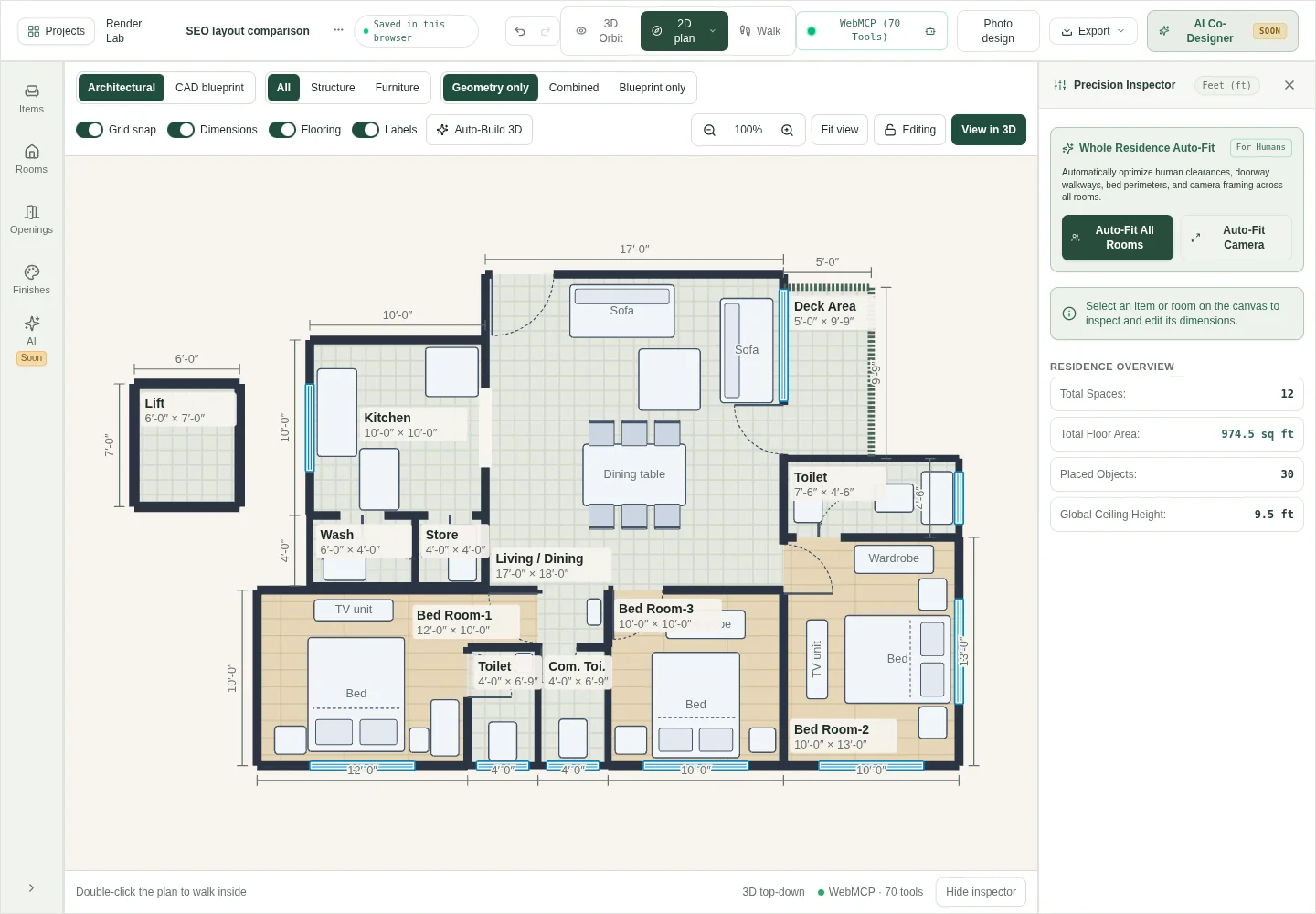
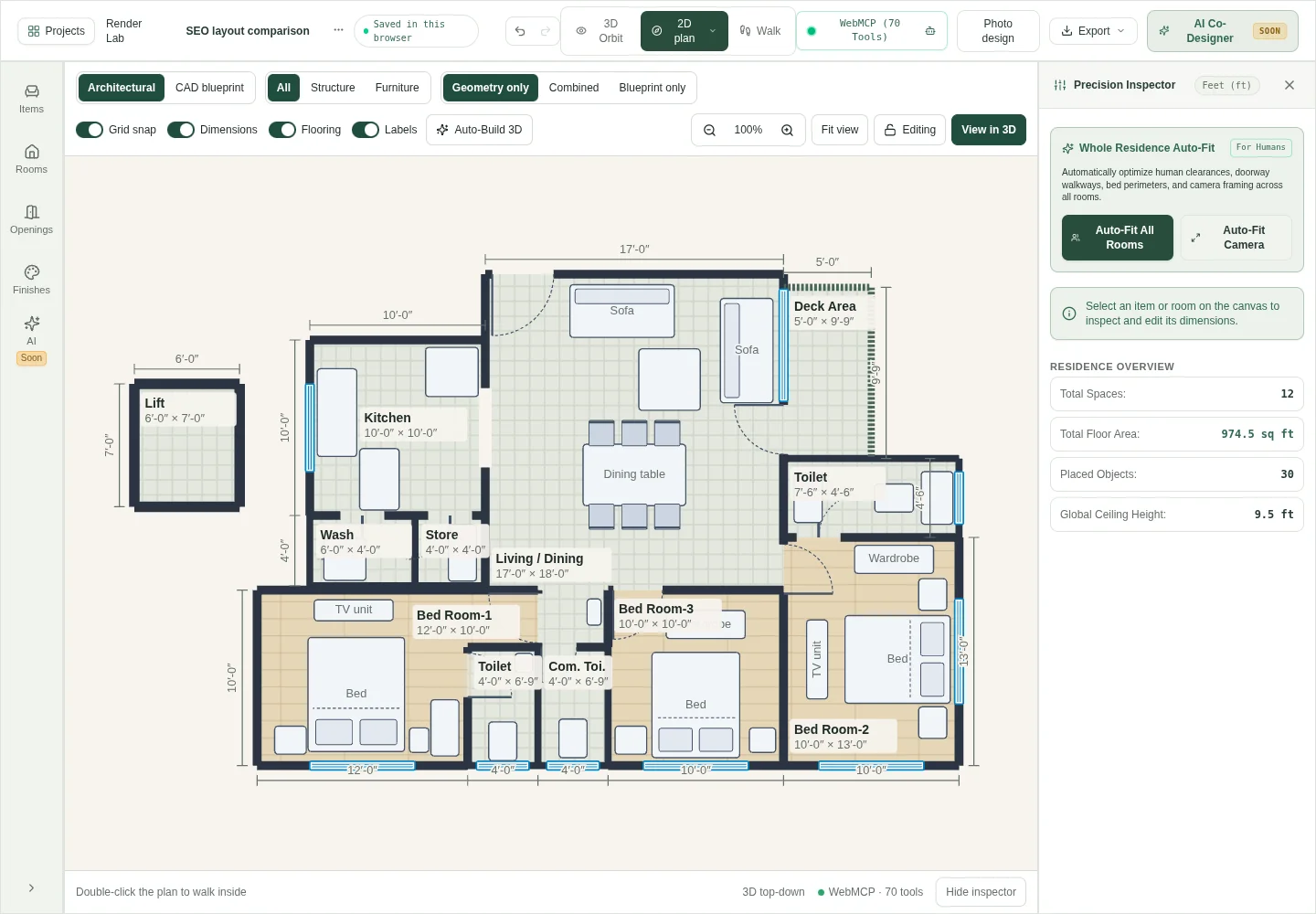
Review both options from the same views
Compare plan views at the same scale first. Check the furniture footprints and the positions of openings. Then compare orbit views of the same alternatives. This helps you connect the top-down drawing with the objects you would see inside the room.
Use walk view for another perspective where your device supports it. Return to plan view when the decision needs a dimension. A camera view can make a space appear larger or smaller, so do not use apparent perspective as a measurement.
Write one benefit and one compromise for each alternative. For example, moving a sofa may change the space beside another item while changing a route elsewhere. Record what you actually observe rather than calling every new arrangement an improvement.
- Can people enter and leave the room during its main activity?
- Can storage, doors, and chairs be used in their operating positions?
- Do the real furniture dimensions match the modeled items?
- Which household need does each alternative support best?
- What remains an assumption or needs an on-site check?
Keep alternatives and unresolved questions
Duplicate the project before a large experiment if you need two separate versions. Give each version a useful name. Keep a screenshot and a short note describing the changed decision. This makes a later discussion easier than relying on memory.
Check the project library save status and export a backup. Account syncing and a browser copy are different storage states. Confirm that the relevant copy is saved before changing devices or clearing browser data.
For a real renovation or build, bring the verified measurements, chosen alternative, and unresolved questions to the appropriate professionals. The planning model supports a clearer discussion. It does not replace structural assessment or local approval work.
Questions before you start
- What should I decide first when planning a house layout?
- Start with the people, activities, measured boundaries, and fixed features. Then identify the most important room relationships and place the largest required furniture. Decorative choices can follow those decisions.
- How do I know whether a house layout is good?
- Check it against specific household tasks. Inspect routes, furniture use, storage access, privacy, and real measurements. Compare the benefit and compromise of each alternative instead of using appearance alone.
- Do I need an open-plan living area?
- That depends on the household and property. Compare the activities that benefit from connection with those that need separation. This sample demonstrates one connected living/dining arrangement; it is not a recommendation for every home.
- Can I compare house layouts online?
- Yes. HouseSpace lets you edit the sample and inspect it in plan, orbit, and walk views. Sign-in is required. Duplicate the project if you need separate alternatives and keep a backup.
- Is the alternative in this article a recommended layout?
- It is a controlled editing example. Only one sofa moves while other conditions remain fixed. Evaluate both arrangements against your own needs and verified dimensions; no universal clearance or compliance result is claimed.
Sources and review
Prepared by HouseSpace from its sample project and current product workflow; reviewed 16 October 2026. This is product guidance, not an architectural certification or an independent software review.