At a glance
- HouseSpace is free during the current preview; studio editing requires sign-in, with no card required.
- Create measured rooms, arrange furniture and switch between plan, orbit and first-person views in a browser.
- Check the project library save status before changing devices and keep an exported backup. Photo generation has separate availability and limits.
What can you do for free in HouseSpace?
The current home planning preview is free to use and does not ask for a card. The studio requires sign-in. You can start with a furnished sample or create a blank project, make measured rooms, arrange furniture and change finishes.
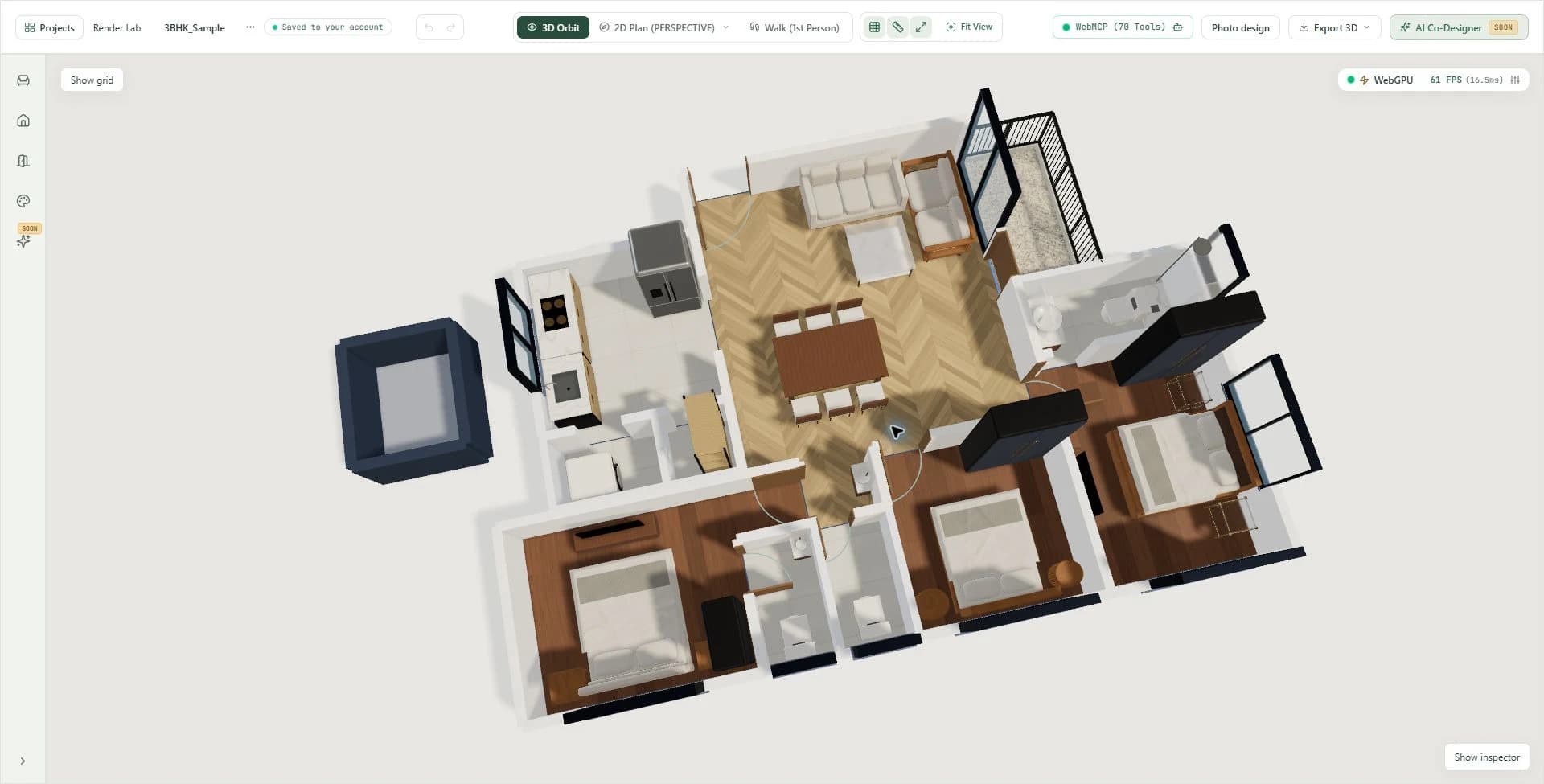
The studio provides a measured plan view, a 3D orbit view and a first-person walk view. These views serve different decisions: check dimensions from above, inspect how furniture relates in 3D, then explore the arrangement from inside the home.
Photo Design is a separate workflow for room-photo concepts, with its own generation availability and limits. Free planning access does not include unlimited AI image generation. Check the current pricing and access information when you start.
What to check in an online house design tool
Choose software around the decision you need to make. If you are checking whether a dining set fits, measured room and furniture editing matter more than a decorative image. If you need to explain a layout to someone else, an understandable 3D view can help you discuss the same arrangement.
Before investing time in a tool, try a small task from start to finish. Set one room to your measurements, place the largest furniture item, change the view and save a copy. This reveals whether the basic workflow supports your needs.
This is a guide to HouseSpace, written by the team publishing the product. It is not an independent ranking or a comparison of competing software. Evaluate the workflow below against your own task before choosing a tool.
- Dimensions and units: can you enter measured room and furniture sizes in units you understand? HouseSpace uses feet for architectural dimensions.
- Openings and routes: can you account for doors, windows and the places people move through?
- Connected views: can you inspect the same arrangement in plan and 3D while making changes?
- Saving and backups: where does the project save, how can you check its status, and can you export a copy?
- Free access: does the current free offer include the editing task you need, and what account or generation limits apply?
- Device support: can your browser handle interactive 3D comfortably with the scene you intend to edit?
Design a house online: a first-session workflow
Use a sample to learn the controls before recreating your whole property. A focused first session can answer one useful question, such as whether a different sofa position makes the route to the dining area easier to follow.
- Open the furnished 3BHK sample and sign in. If you have edited this sample before, it returns to your saved version.
- Duplicate the project in the project library if you want to keep the original and the experiment separately.
- Switch to plan view. Inspect the living/dining room, its openings and the furniture footprints before editing.
- Select one furniture item and move, rotate or resize it. For a purchase decision, enter dimensions from the actual product.
- Inspect the arrangement in orbit view, then walk through it. Return to plan view for measurement checks.
- Check the save status and export a backup from the project library. Record what improved and what still needs work.
Start your own home from measured rooms
Once you understand the sample, create a blank project for your own home. Record each wall, opening and fixed feature before placing furniture. Use consistent units, and distinguish a measurement you took from an assumption you still need to verify.
HouseSpace supports rectangular and L-shaped rooms, openings, furniture dimensions and surface finishes. Build the room shape first, then add the items that constrain the arrangement: a bed, a wardrobe, a dining table or a kitchen appliance.
A reference drawing can guide this process, but general automatic conversion of arbitrary uploaded blueprints is not currently available. Opening the bundled 3BHK sample loads that example; it does not turn your own plan image into a measured model.
Save your project and keep a backup
Projects keep a browser copy and can sync with your account when account saving is available. Check the project library save status before switching devices. If account saving is unavailable, new changes remain saved in the current browser.
Use Export Backup JSON in the project library to download a project backup before clearing browser data or making a major comparison. A backup is a copy you keep; it is different from a link that shows someone a design.
Name alternatives by the decision they test, such as “Dining table beside kitchen” and “More space at deck entrance.” Clear names help when you return to the project or discuss the options with someone else.
Browser and device requirements
Reading this guide does not require interactive 3D. Editing a design requires JavaScript, browser storage and graphics support. The HouseSpace studio uses WebGPU when available with a WebGL fallback.
A larger screen and a pointer device can make precise placement and measurement work easier. Test the furnished sample on your intended device before committing to a detailed home model, and keep a backup when moving between browsers or devices.
Use 3D planning for the decisions it can answer
A 3D home design helps you compare furniture positions, room connections and finishes. It can make a discussion more concrete because everyone can inspect the same arrangement. It does not establish structural safety, local compliance, material quantities or construction accuracy.
For a renovation or new build, take the measured design and your unresolved questions to the appropriate professionals. Keep early layout exploration and construction documentation as separate stages of the project.
Questions before you start
- Can I design my house online for free?
- You can use the current HouseSpace planning preview for free without a card. Sign-in is required for the studio. Create rooms, arrange furniture and inspect a design in plan, orbit and walk views; check the pricing page for current access information.
- Do I need to download house design software?
- No. HouseSpace runs in your browser. The interactive studio requires JavaScript, browser storage and supported 3D graphics. Downloading a project backup is optional and does not install software.
- Can I use free 3D house design software online without signing up?
- HouseSpace public guides and sample information are readable without an account. Opening the interactive studio requires sign-in. Check account requirements before choosing any online tool.
- Can I upload a floor plan and get a 3D house automatically?
- General automatic conversion of arbitrary uploaded plans is not currently available in HouseSpace. Start with a bundled sample or create measured rooms for your property.
- Will my project be available on another device?
- Projects can sync across devices when account saving is available and syncing has completed. Check the project library save status before switching devices, and keep an exported backup. A browser-only copy stays in that browser on that device.
- Is a 3D walkthrough the same as a construction drawing?
- No. A walkthrough supports early layout and appearance decisions. Construction documentation requires verified measurements and the appropriate architectural, engineering and local approval work.
Sources and review
Prepared by HouseSpace from its sample project and current product workflow; reviewed 13 October 2026. This is product guidance, not an architectural certification or an independent software review.