At a glance
- Choose the required output first: a measured plan, furniture arrangement, appearance concept, or construction documentation.
- Test dimensions, openings, connected views, saving, and output with one small task before a full home project.
- This checklist is published by HouseSpace. It uses HouseSpace examples and does not rank competing products or claim independent testing.
Choose the task before the feature list
A house planner can serve several different tasks. You may need to draw measured rooms, compare furniture, show a design in 3D, convert an existing drawing, or generate a concept. One product may support some of these tasks and not others.
Write the required outcome in one sentence. For example: “I need to check a bed and wardrobe in my measured bedroom and keep an editable copy.” This makes room dimensions, furniture sizes, and saved output more important than an unrelated rendering effect.
Keep construction documentation as a separate requirement. A planning model or a walkthrough does not, by itself, establish suitability for approvals or building work. If that is the required output, involve the appropriate professionals in the software decision.
Check measurements, room shapes, and openings
Try entering a known room dimension. Confirm the unit and check whether the room shape matches the property. A rectangular tool may be sufficient for one room but difficult for an alcove or a change in wall direction.
Place an opening from a reference corner and check it against your notes. Then inspect the furniture dimensions. Changing the screen zoom should not change the actual room size. A clear separation between display controls and real dimensions prevents avoidable mistakes.
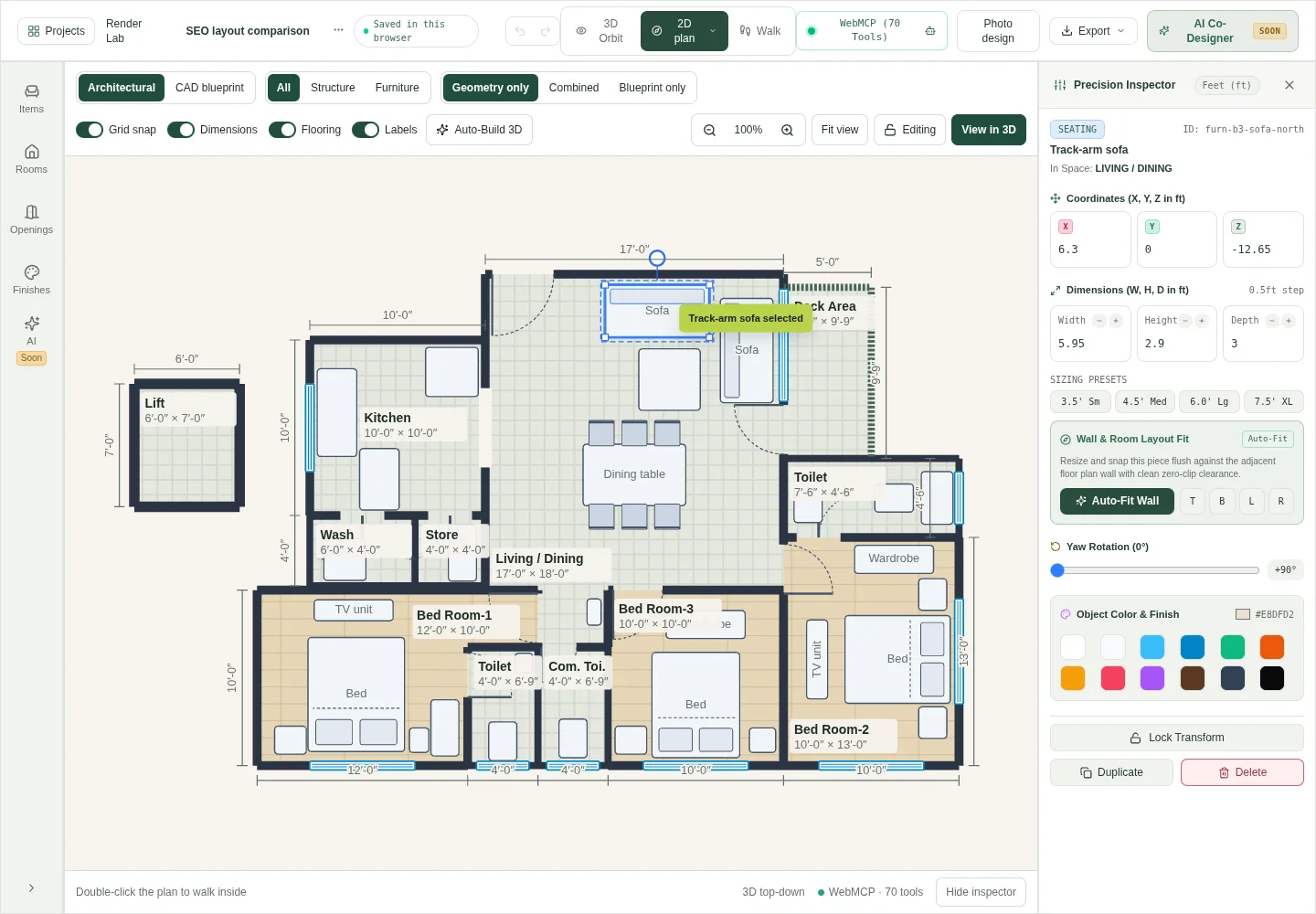
In the HouseSpace example, the plan view shows room labels and dimensions. Selecting furniture opens position and other item controls. Use those controls with measurements from the real item rather than assuming the catalog object matches a purchase.
Compare the views and the output you can edit
Switch between plan and 3D while looking at the same furniture arrangement. Check that a change appears in both views. This is more useful for a layout discussion than maintaining unrelated images that can drift apart.
Distinguish editing from presentation. A screenshot preserves the appearance at one moment. An editable project preserves the elements needed for another change. A model export serves another use and may not retain the full editing behavior of the original application.
Ask what the recipient actually needs. A homeowner discussing seating may need a clear image and an editable project. A professional exchanging technical documents may need specific formats and additional information. Verify the exact output with a small example rather than inferring support from the word “export.”
Use a task-based selection checklist
For each tool, record what you observed, what remains unclear, and what is not available. A supported feature is useful only when you can complete the relevant task. Keep a short note or screenshot as evidence.
| Need | Test | Evidence to keep |
|---|---|---|
| Measured geometry | Enter a known room and place one opening | Dimensions and opening position |
| Furniture fit | Set an item to its actual size and move it | Before/after position and size |
| Connected views | Inspect the same edit in plan and 3D | Matching arrangement in both views |
| Saved work | Save, reopen, and check the latest change | Visible status and restored edit |
| Editable backup | Export and test reopening an appropriate copy | A usable file and its format |
| Access limits | Check the account, price, and operation limits | Current published terms |
Try the planner before you choose it
Choose your task, then record the checks you complete. The next useful test changes with your goal.
Your next useful check
Enter a known room dimension
Confirm the unit, outline, and an opening position.These are your trial notes, not a software rating. Notes reset when this page reloads.
Complete a small trial before a whole-home project
Use one room or a supplied sample for the first session. This keeps the test focused and makes it easier to identify whether a problem concerns the tool, the measurements, or your understanding of the controls.
The local HouseSpace demonstration selects one sofa in the sample, moves it by 2 ft, and switches to orbit view. That sequence tests a concrete planning operation. Your trial should also include reopening the work if saved output matters to you.
- Write the task and required output before opening the tool.
- Enter a known room or inspect a documented sample.
- Place or select one item and confirm its dimensions.
- Make one change and inspect it in plan and 3D.
- Save the project and reopen it to confirm the edit.
- Record the useful result, missing feature, and access conditions.
Check free access and device requirements separately
Check the specific task included in a free offer. Editing, image generation, high-resolution output, and storage may have different limits. Confirm whether an account or card is needed before you invest time in a large model.
HouseSpace currently offers a free planning preview with sign-in and no card. Photo generation has separate availability and limits. Read the current pricing page when you begin because access terms can change.
Test the intended device and browser. Public articles are readable without interactive 3D, while editing needs JavaScript, browser storage, and supported graphics. A larger screen can make detailed placement easier. Judge the actual sample on your device rather than relying on a desktop recording.
Confirm saving, backups, and the next decision
Ask where the project is saved and how you can confirm the latest edit is there. Browser-local storage and account syncing behave differently. If you need to change devices, test that requirement explicitly rather than assuming sign-in guarantees that the latest version is available.
For HouseSpace, check the project library save status and keep an exported backup. Do not clear browser data before securing a needed browser-only copy. Keep sample experiments separate from any original project you need to preserve.
Choose the planner that completes the required task with understandable limits. Record an unresolved need before moving on to a bigger home model. A clear practical result is a stronger basis for the choice than a feature you have not tested.
Questions before you start
- What should a beginner look for in a house planner?
- Start with clear dimensions, opening placement, furniture editing, understandable views, and a way to keep the work. Test one small task and check account and access terms before recreating the whole property.
- Is a floor-plan maker the same as an AI generator?
- Not necessarily. A floor-plan maker may let you draw and edit rooms manually. A generator proposes a layout from inputs. Check the actual workflow and whether the output remains editable.
- Which house planner is best?
- The suitable choice depends on the task, required output, device, and budget. This article provides a practical checklist and HouseSpace examples. It is not an independent ranking of software products.
- Can I try HouseSpace before paying?
- The current planning preview is free with sign-in and no card. Use the sample to test editing and views. Check the pricing page for current terms and keep photo-generation availability separate from planning access.
- How do I compare tools without rebuilding my whole house?
- Use the same small task in each tool: one measured room, one correctly sized item, one edit, a view change, and saved output. Record observed results and any feature that remains unclear.
Sources and review
Prepared by HouseSpace from its sample project and current product workflow; reviewed 16 October 2026. This is product guidance, not an architectural certification or an independent software review.